About
The D-INFK Master Thesis Lab is a great place to work because it has plenty of space in a quiet environment. But to work there, a registration is required, which can only be made by D-INFK staff members.
However, there usually are some desks that are not reserved, but people will get angry if you steal their seat.
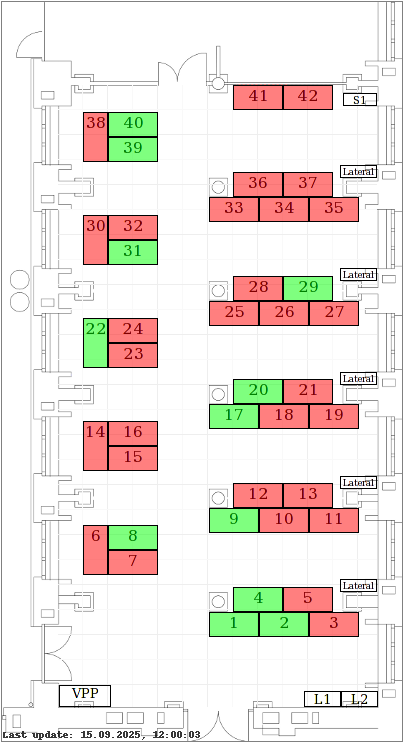
You can check out the current reservations at https://cab-e-81.inf.ethz.ch/reservation/overview, but the overview is not very well designed.
So, out of procrastination I wrote a little script to parse their page and display the reservation status for each table on the plan. It runs on my Raspberry Pi and gets executed daily via cronjob.
Update 2024-02-26
Regarding the cronjob, I sometimes wondered why changes were not immediately displayed. At first, I assumed that it was a caching issue, because when I ran the script manually, the file got updated again. Then, I ran across a similar problem on another small project: a script gets executed by cron to insert events into a database. Strangely, new database entries were always missing at first, but showed up when running the script manually.
Nothing wrong here, right?
# check lab reservation

        00 */6 * * * python3 /var/www/reservationchecker/main.py >/dev/null 2>&1 &
After searching around, I found the culprit: crontab executes everything from the home directory, but my scripts were relying on relative paths. And indeed: there was a reservations.png file in my home directory, with its modification date matching the cronjob's last run. Wow.
There are two possible fixes:
Either change the working directory prior to executing the file in cron:
00 */6 * * * cd /var/www/reservationchecker && python3 /var/www/reservationchecker/main.py >/dev/null 2>&1 &
Or use absolute paths in Python:
filename = os.path.dirname(os.path.realpath(__file__)) + "/reservations.png"
The only question remaining: is there any difference between os.path.realpath(os.path.dirname(__file__)) and os.path.dirname(os.path.realpath(__file__))?
Update 2025-04-01
After one too many power outages due to a toaster and a flat iron being plugged in at the same time, I decided to move this page to a cloud server.
Not only does this ease my conscience a little, it also gives me an opportunity to retire my Raspberry Pi for other projects, to learn more about webservers and the whole CI/CD craze.